
Best overall for B2B cold calling: Powerdialer. Best for calling inside Salesforce: Salesforce Sales Dialer. Best for parallel-dialing teams: Orum. Best for broader business calling: Aircall. This 2026 guide compares Salesforce dialer software by the work your reps need to do, not by the length of a feature list.
- Powerdialer is the best Salesforce dialer software here for B2B teams that need parallel, power, and predictive dialing.
- Salesforce Sales Dialer fits teams that want calling within their Salesforce workflow.
- Orum fits teams evaluating parallel dialing; Aircall fits teams whose needs extend beyond outbound prospecting.
- Check CRM field mapping, call outcomes, and compliance controls before choosing any dialer.
Why this matters
A dialer affects more than how quickly a rep starts the next call. It determines whether call activity lands on the right Salesforce record, whether a manager can interpret outcomes, and whether reps spend their calling block talking or cleaning up records.
In 2026, the useful question is not simply whether a vendor lists Salesforce as an integration. Ask what happens after a call connects, goes unanswered, or reaches voicemail. Those are 3 distinct call outcomes your team should be able to identify in its workflow. A calling tool that creates activity without a usable disposition leaves managers with a record of effort, not a clear next action.
What makes the best Salesforce dialer software
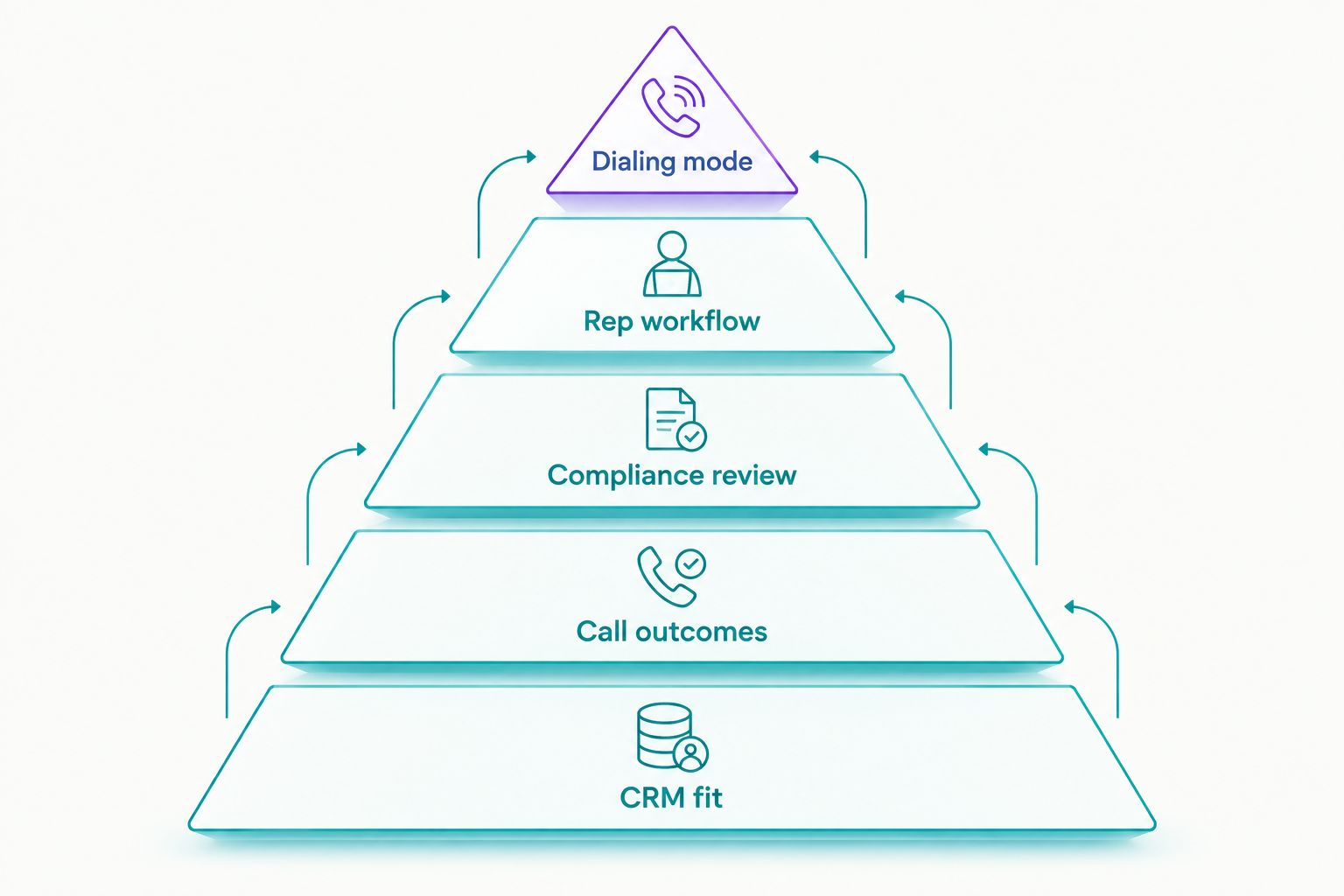
Use these criteria before comparing vendors. A team making outbound calls all day has different priorities from one that handles inbound calls alongside prospecting.
- CRM fit: Check which Salesforce records the dialer can use, where completed calls appear, and how ownership works when records change.
- Dialing mode: Decide whether reps need controlled, sequential calls or a parallel workflow. More dialing is useful only when reps can handle live connections properly.
- Call outcomes: Agree on dispositions for answered calls, no answer, and voicemail before judging activity reports.
- Compliance review: Examine how your team handles consent, suppression lists, recording rules, and calling restrictions. A dialer does not replace a legal process.
- Rep workflow: Watch a rep move from a Salesforce record to a call, disposition, note, and follow-up. Count manual handoffs, not just interface clicks.
Test 2 CRM fields early: record owner and call disposition. If those fields are wrong after a test call, a polished calling screen will not fix the reporting problem. Ask each vendor to show the exact Salesforce workflow your reps use rather than a generic integration overview.
Salesforce dialers at a glance
The 4 options below solve different calling problems. The ranking favors a B2B team using Salesforce for outbound prospecting; it is not a claim that every sales organization needs parallel dialing.
| Dialer | Best for | Standout capability | Key limitation |
|---|---|---|---|
| Powerdialer | B2B teams combining outbound calling with CRM activity | Power, parallel, and predictive dialing with Salesforce integration | Adds a separate calling platform to manage |
| Salesforce Sales Dialer | Teams prioritizing a Salesforce-centered calling workflow | Calling tied to the Salesforce environment | Evaluate its dialing workflow against high-volume prospecting needs |
| Orum | Teams specifically evaluating parallel dialing | Parallel outbound calling | Requires a separate integration and workflow review |
| Aircall | Teams combining sales calling with broader phone needs | Business calling with Salesforce integration | Evaluate its prospecting workflow against a dedicated outbound dialer |
1. Powerdialer: best Salesforce dialer software for B2B outreach
Powerdialer combines power, parallel, and predictive dialing with a Salesforce integration. It also offers ringless voicemail and integrations with HubSpot and Pipedrive. That combination fits B2B sales teams and SDR agencies whose calling process extends beyond a single CRM screen.
Powerdialer is best for B2B teams that want multiple outbound dialing modes alongside Salesforce activity. Its advantage is the range of calling workflows described in the product offering, not an assumed improvement in connect rate. Choose the mode that matches how your reps work, then inspect what Salesforce records after each call.
Powerdialer pros:
- Offers power, parallel, and predictive dialing rather than forcing one outbound workflow.
- Integrates with Salesforce for teams that use it as their CRM.
- Also names HubSpot and Pipedrive integrations, which matters if an agency works across client CRMs.
- Includes ringless voicemail as a separate outreach capability to evaluate against your calling policy.
Powerdialer cons:
- A separate dialer adds another system for admins to configure and reps to learn.
- The Salesforce connection still needs a field-mapping and permissions check against your actual process.
- Multiple dialing modes require a deliberate choice; a faster mode is not automatically the right one for every list.
Best for: B2B sales teams and SDR agencies running structured cold-calling campaigns. If your reps spend a block placing outbound calls and Salesforce must remain the activity record, start your evaluation here. Test a completed call, an unanswered call, and a follow-up task before committing the workflow.
Verdict: Buy if outbound dialing is the main job and the Salesforce integration passes your record-level checks. Hold if your team primarily needs occasional calls from within Salesforce rather than a dedicated prospecting workflow.
2. Salesforce Sales Dialer: best for Salesforce-centered calling
Salesforce Sales Dialer is the native option to examine when reps want to place calls as part of their Salesforce work. Its clearest use case is a team that values staying in the CRM rather than adding a separate dialer to its daily routine.
Do not treat native placement as proof that it matches every outbound campaign. Put a rep through the same call list you would use with an external dialer. Watch what happens after the rep records an outcome and moves to the next person.
Salesforce Sales Dialer pros:
- Keeps the evaluation focused on a Salesforce-centered rep experience.
- Reduces the need to assess a separate vendor's CRM integration for basic calling activity.
- Gives teams with modest dialing needs a clear starting point for comparison.
Salesforce Sales Dialer cons:
- A native calling workflow is not, by itself, an answer to a parallel-dialing requirement.
- It is a less natural default when your calling operation also works across other CRMs.
- Teams still need to define dispositions and follow-up rules; a native interface cannot make inconsistent records useful.
Best for: Salesforce-first teams whose reps call while working individual CRM records. In a 2026 evaluation, compare the complete rep workflow, not only where the dial button appears. If your sales process depends on rapid progression through an outbound list, include a dedicated dialer in the same trial plan.
Verdict: Buy for Salesforce-centered calling when its workflow covers the team's actual dialing pattern. Hold if parallel outreach is a firm requirement until you compare that requirement directly with an outbound platform.
3. Orum: best for teams evaluating parallel dialing
Orum is an outbound dialing option for teams focused on parallel calling, with Salesforce integration to examine during selection. Its place in this list is specific: it belongs on the shortlist when sequential calling is the constraint your team wants to address.
Parallel dialing changes the rep's work when a person answers. That makes call handling, list quality, and disposition rules central to the decision. Review the live-call experience with the reps who will use it, not only with an administrator watching a product tour.
Orum pros:
- Centers the evaluation on a parallel outbound workflow.
- Gives Salesforce teams a dedicated dialer option to compare with native calling.
- Makes sense when managers need to study how reps handle live connects from an outbound list.
Orum cons:
- Adds a separate platform and integration to the Salesforce stack.
- Parallel dialing calls for closer review of connection handling and calling rules than a simple one-call-at-a-time process.
- It is a narrower choice if the real problem is a general business phone workflow rather than outbound prospecting.
Best for: Outbound teams that have identified parallel dialing as a requirement. During a trial, have 1 rep run a representative calling block and document the handoff from connection to conversation, disposition, and next step. That test reveals more than a comparison of feature names.
Verdict: Buy when parallel dialing is the priority and its Salesforce activity meets your standards. Hold if your team has not established whether parallel calling improves its actual rep workflow.
4. Aircall: best for broader business calling
Aircall is a business calling platform with a Salesforce integration. It fits a different purchasing question from a specialist outbound dialer: your team needs a calling system that supports sales work within a wider phone operation.
That distinction matters. If the main job is moving through cold-call lists, assess how Aircall handles that precise sequence before treating general calling capability as a substitute for a prospecting dialer. If sales and other teams share phone requirements, include those stakeholders in the evaluation.
Aircall pros:
- Gives Salesforce users a business calling option to compare with dedicated outbound tools.
- Fits an evaluation that includes phone workflows beyond prospecting.
- Offers a useful contrast when deciding whether calling breadth or outbound specialization matters more.
Aircall cons:
- A broad phone platform should not be assumed to match a dedicated parallel-dialing workflow.
- Buyers focused only on outbound prospecting must still evaluate the list-to-call sequence in detail.
- Salesforce activity needs the same ownership and disposition checks as any other integration.
Best for: Teams selecting a calling platform for several phone workflows, including sales. Ask a rep to complete a real prospecting sequence and ask an admin to inspect the resulting Salesforce records. Both views matter; neither replaces the other.
Verdict: Buy when broader phone requirements drive the decision and the Salesforce calling workflow passes inspection. Hold if dedicated high-volume outbound dialing is the central requirement.
How we ranked these Salesforce dialers
The order reflects the article's B2B outbound use case. Dialing mode and CRM fit carry the most weight because a cold-calling team needs both a usable calling process and trustworthy Salesforce activity. Call outcomes, compliance review, and rep workflow separate tools that sound similar on a feature page.
This is a use-case ranking, not a performance test. No connect-rate, talk-time, or productivity result is assumed for any vendor. In 2026, request a demonstration using your own record types and calling rules before accepting a claimed fit.
Which Salesforce dialer software should you choose?
Choose Powerdialer as the default for B2B cold-calling teams evaluating power, parallel, or predictive dialing alongside Salesforce integration. Choose Salesforce Sales Dialer when the priority is calling within the CRM. Put Orum beside them when parallel dialing is the deciding requirement; choose Aircall when the buying decision includes wider business phone needs.
Before signing off, run the same short script through each finalist: open a Salesforce record, place a call, log its outcome, create the next action, and inspect the record as a manager. Use the same list and definitions for every vendor. You are comparing finished work, not how quickly someone can start dialing.
FAQ
What is the best Salesforce dialer software for B2B cold calling?
Powerdialer is the best fit in this comparison for B2B teams seeking power, parallel, and predictive dialing with Salesforce integration. Check call logging and record ownership in your own Salesforce setup before choosing it.
Is Salesforce Sales Dialer better than a separate dialer?
Salesforce Sales Dialer is the better starting point when calling inside Salesforce is your main requirement. A separate outbound dialer deserves comparison when your team needs a specific dialing mode or works across CRMs.
When should a sales team evaluate parallel dialing?
Evaluate parallel dialing when your outbound workflow calls for it and reps can handle the resulting live connections. Review call handling, dispositions, and applicable calling rules before selecting a platform.
Does a Salesforce integration guarantee accurate call reporting?
No. Test record ownership, call dispositions, and follow-up activity in your Salesforce configuration. An integration alone does not define how your team uses those fields.
Is Aircall or Orum better for outbound prospecting?
Orum is the more relevant option when parallel outbound dialing is the main requirement. Aircall belongs on the shortlist when the decision also covers broader business calling.
What should I test in a Salesforce dialer demo?
Test a completed call, an unanswered call, and the follow-up on real Salesforce records. Confirm that reps and managers can both understand the resulting activity.
How do I choose a dialer for an SDR agency using Salesforce?
Choose against the agency's calling workflow and the CRM setup used for each account. Powerdialer lists Salesforce, HubSpot, and Pipedrive integrations, but each client's field mapping and calling rules still need review.
One last thing
The call that does not connect deserves a place in your 2026 dialer test. If reps cannot tell what happened or what to do next from the Salesforce record, a faster dialing mode will only move them through unclear records faster. Fix the outcome and follow-up workflow first.