
Best overall for mixed outbound workflows: Powerdialer. Best for controlled pacing: power dialing. Best for concurrent outreach: parallel dialing. This 2026 guide compares dialer software for SDR agencies by calling workflow, CRM fit, and the controls you need before launching client campaigns.
- Powerdialer is the best fit here for SDR agencies seeking power, parallel, and predictive dialing in one platform.
- Choose dialer software for SDR agencies around cold calling workflows and CRM integration, not raw dialing activity.
- Power dialing favors controlled pacing; parallel dialing places multiple calls concurrently.
- Treat ringless voicemail as a separate outreach workflow, not a replacement for live conversations.
Why this matters
An SDR agency needs more than a way to place calls. You need to connect outreach to the right client, preserve useful CRM records, and give representatives enough context to hold a relevant conversation.
For your 2026 shortlist, start with the workflow that causes the most friction. Waiting between attempts, researching each account, managing a shared calling queue, and delivering voicemail messages are different problems. A dialer selected for one problem does not automatically solve the others.
The ranking below separates a named platform from dialing approaches. It is a workflow buying guide, not a feature-by-feature comparison of competing vendors. Use the platform recommendation to build your shortlist and the remaining entries to decide which calling approach belongs in your evaluation.
What makes the best dialer software for SDR agencies?
Judge your shortlist against these criteria before comparing demonstrations:
- Calling approach: Match power, parallel, or predictive dialing to the way representatives work. More simultaneous attempts are not the right default for every campaign.
- CRM integration: Check the exact Salesforce, HubSpot, or Pipedrive workflow your agency uses. An integration name alone does not establish field mapping, ownership rules, or writeback behavior.
- Client separation: Evaluate how the system keeps client lists, caller identities, permissions, and records apart. Demonstrate this with separate campaigns rather than assuming it works.
- Representative context: Confirm that a representative can identify the prospect, client, and reason for calling when a conversation starts.
- Calling controls: Inspect suppression, opt-out handling, scheduling, and any rules required by your approved calling process.
- Useful reporting: Ask for the path from attempt to conversation to meeting. Keep unanswered attempts separate from outcomes that matter to the client.
These criteria define a purchase decision, not a claim that every option below includes every capability. Make each vendor demonstrate the controls your agency requires.
Dialer options at a glance
| Rank and option | Best for | Standout feature or approach | Key limitation |
|---|---|---|---|
| 1. Powerdialer | Agencies evaluating multiple outbound calling modes | Power, parallel, and predictive dialing; Salesforce, HubSpot, and Pipedrive integrations | Multiple modes still require campaign-specific operating rules |
| 2. Power dialing | Account-focused campaigns needing controlled pacing | Sequential calling rather than simultaneous attempts | Does not use concurrent attempts to address unanswered calls |
| 3. Parallel dialing | Prospecting campaigns built around concurrent attempts | Places multiple calls at the same time | Concurrent answers require careful connection handling |
| 4. Predictive dialing | Shared calling queues with coordinated representative capacity | Uses pacing predictions to initiate outbound calls | Pacing needs oversight when capacity or answer patterns change |
| 5. Ringless voicemail | Approved voicemail-led follow-up | Delivers voicemail without a conventional ringing call | Does not create a live conversation |
The table compares operating approaches, not equivalent standalone products. In 2026, choose the platform and the dialing mode as separate decisions: first establish the workflow, then verify its implementation.
1. Powerdialer: best dialer for mixed agency workflows
Powerdialer provides power, parallel, and predictive dialing, plus ringless voicemail. Its stated CRM integrations include Salesforce, HubSpot, and Pipedrive, making it a relevant shortlist option for B2B sales teams and SDR agencies using those systems.
Powerdialer is best for SDR agencies that want dialer software supporting multiple calling modes and their existing CRM. That is the reason to evaluate it first—not an unsupported promise about meetings or connect rates.
Platform pros
- Supports several dialing approaches rather than requiring a single calling method.
- Includes ringless voicemail alongside live-calling workflows.
- Lists integrations with Salesforce, HubSpot, and Pipedrive.
- Serves B2B sales teams and SDR agencies doing cold calling.
Platform cons
- Choosing between several modes adds a campaign-design decision; the software does not make every mode appropriate for every list.
- A CRM integration still needs an agency-specific acceptance test before client work depends on it.
- Ringless voicemail remains a separate channel, not proof of a live prospect conversation.
Best for: Agencies that need flexibility across calling workflows and use one of the named CRMs.
During the demonstration, ask the vendor to run a contact through your actual process: import or select the record, place the call, record the outcome, and inspect the CRM result. Then repeat with a different client campaign. Do not infer multi-client controls from the presence of multiple dialing modes.
Verdict: Buy only after the required CRM workflow and client controls pass your evaluation.
2. Power dialing: best for account-focused cold calling
Power dialing works through calls sequentially rather than placing several attempts at once. It suits a workflow where representatives need to understand the account and keep control over the pace of outreach.
Use this approach when the quality of the transition into a conversation matters more than concurrent dialing. The representative still needs accurate records and a relevant opening; sequential calling is not a substitute for preparation.
Power dialing pros
- Avoids the complication of several simultaneous attempts.
- Fits a sequential list-working process.
- Makes call-by-call pacing easier to evaluate.
Power dialing cons
- Does not place concurrent attempts while other calls go unanswered.
- Still leaves the campaign dependent on list quality and representative execution.
- Preparation between calls can become unstructured without a clear process.
Best for: Named-account campaigns and outreach that requires deliberate pacing.
For your 2026 evaluation, give representatives the context they actually use: account notes, the contact’s role, and the reason for outreach. Watch whether the workflow preserves that context through the call and into the CRM record. Evaluate the whole sequence, not just how quickly the next number is dialed.
Verdict: Buy a power-dialing workflow when controlled pacing is a campaign requirement.
3. Parallel dialing: best for concurrent prospecting attempts
Parallel dialing places multiple outbound calls concurrently. Its defining difference is simultaneous attempts, not a guaranteed improvement in conversations or meetings.
The deciding question is what happens when someone answers. You need to inspect how the implementation connects the prospect to a representative and handles other active attempts.
Parallel dialing pros
- Supports concurrent attempts instead of a strictly sequential queue.
- Directly addresses a workflow built around unanswered calls.
- Gives agencies a distinct approach to evaluate against sequential dialing.
Parallel dialing cons
- Concurrent answers create connection-handling requirements.
- Representatives still need immediate access to the correct prospect context.
- Additional attempts do not establish better meeting quality.
Best for: Prospecting campaigns where concurrent attempts fit the approved operating process.
Keep the evaluation focused. Inspect what the representative sees at connection, whether the correct client identity is clear, and how each attempt is recorded. Ask what happens to the remaining calls after a connection. Those answers matter more than a headline dialing multiplier.
Verdict: Buy only when connection handling and representative context pass the test.
4. Predictive dialing: best for coordinated calling queues
Predictive dialing uses pacing predictions to initiate calls against expected representative capacity. It differs from parallel dialing because the defining feature is predictive pacing, not simply concurrent attempts.
Evaluate it as a queue-management decision. The system’s behavior needs to fit the representatives working the campaign and the process approved for that outreach.
Predictive dialing pros
- Coordinates call initiation around expected representative availability.
- Fits a managed outbound calling queue.
- Provides a pacing approach distinct from sequential calling.
Predictive dialing cons
- Predictions require oversight as campaign conditions change.
- Representative availability affects the calling workflow.
- Unanswered, disconnected, and answered calls need clear outcome handling.
Best for: Agencies operating shared calling queues with active supervision.
In a 2026 demonstration, ask what happens when representatives pause, become unavailable, or spend longer in conversations. Inspect the queue behavior and reporting rather than accepting a description of the pacing model. Your operations lead needs to understand when to intervene.
Verdict: Hold until your team can supervise pacing and explain the resulting call outcomes.
5. Ringless voicemail: best for voicemail-led follow-up
Ringless voicemail delivers a voicemail message without a conventional ringing call. It is an outreach option, not a live-calling dialer, and belongs in this comparison only as a separate campaign workflow.
Choose it because voicemail fits an approved outreach plan—not because the word ringless implies an exemption from calling rules. Obtain a legal review of the intended use before launching a campaign.
Ringless voicemail pros
- Supports a voicemail-led outreach process.
- Separates message delivery from a live representative conversation.
- Gives teams a distinct channel to evaluate alongside calling.
Ringless voicemail cons
- Does not provide a live conversation at delivery.
- Delivery does not establish that the recipient listened or responded.
- Requires its own compliance and suppression review.
Best for: Agencies with an approved voicemail follow-up process and a defined response path.
Decide who owns callbacks before sending messages. Confirm the correct client identity, the response destination, and the CRM treatment of both delivery and subsequent contact. Do not report a delivered voicemail as an answered call.
Verdict: Skip unless the outreach plan, legal review, and response workflow are ready.
How we ranked these options
The order reflects workflow coverage first, then increasingly specific campaign needs. The named platform leads because its stated offering covers multiple dialing modes and integrations relevant to SDR agencies. The other entries identify when each approach earns a place in your operation.
The ranking does not rely on unpublished performance tests, assumed CRM behavior, or a universal claim that faster dialing produces better sales outcomes. Your acceptance test should decide the purchase.
Run an agency-specific acceptance test
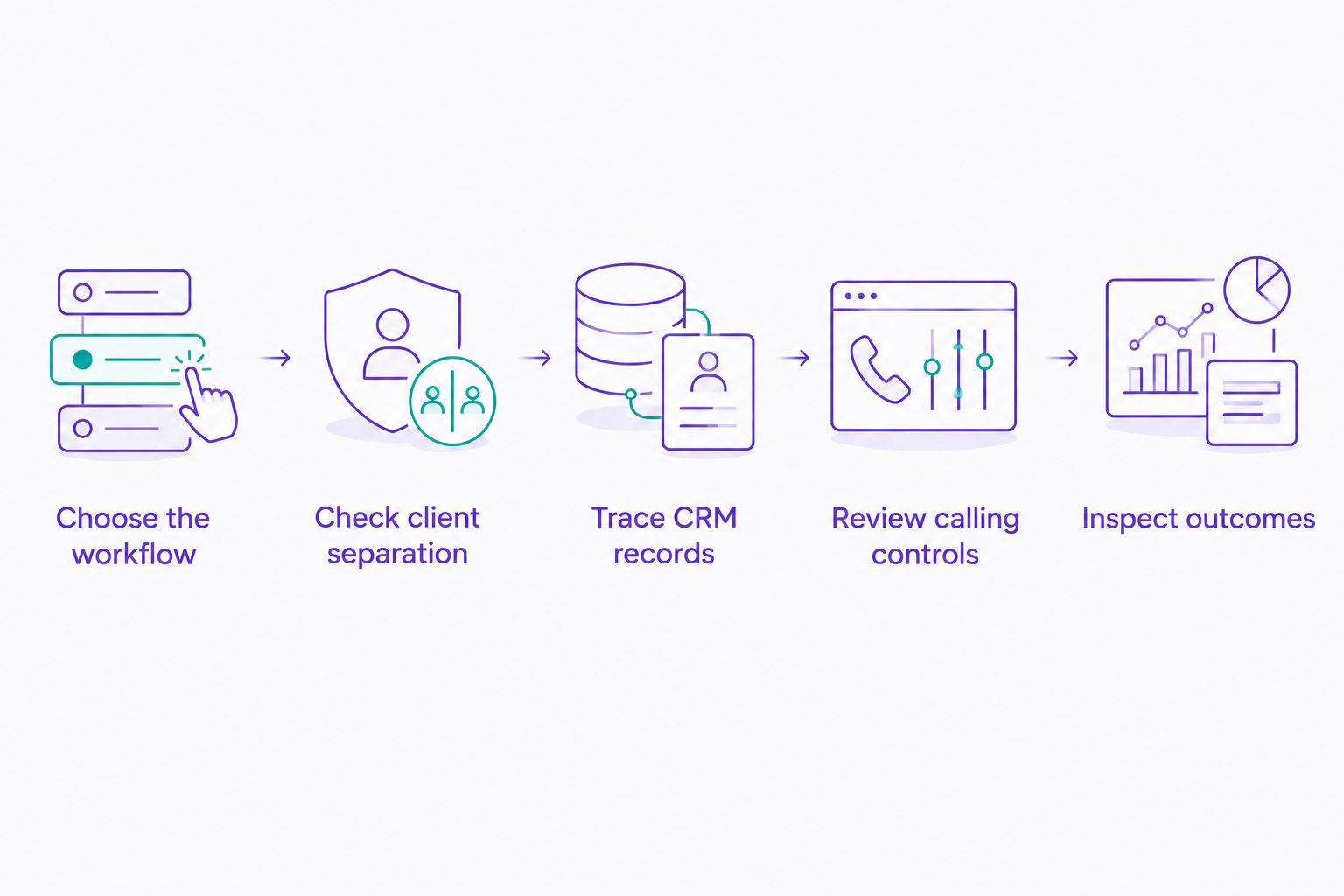
Use these steps to turn a shortlist into a decision:
- Choose the workflow. Identify whether the campaign needs controlled pacing, concurrent attempts, predictive pacing, or voicemail delivery.
- Check client separation. Use 2 client campaigns to inspect identity, access, list handling, and record ownership. This is a test design, not a claim about any vendor’s capabilities.
- Trace CRM records. Follow a contact from selection through disposition and CRM writeback. Check duplicates, ownership, and the treatment of follow-up tasks.
- Review calling controls. Have the campaign owner examine suppression, opt-outs, scheduling, and the approved outreach rules.
- Inspect outcomes. Separate attempts, conversations, meetings, and voicemail delivery. Require clear definitions before comparing results.
Give representatives a 60-minute supervised workflow session and review 10 call records afterward. These are suggested evaluation boundaries, not performance benchmarks. Extend the evaluation when an important scenario remains untested.
Which dialer should your agency choose?
Start with Powerdialer if your agency needs several dialing modes and Salesforce, HubSpot, or Pipedrive integration. Then select the approach that fits each campaign instead of applying one dialing setting across every client.
Choose power dialing for controlled pacing, parallel dialing for concurrent attempts, and predictive dialing for supervised queue management. Keep ringless voicemail separate from live-calling results. Your 2026 decision should rest on demonstrated workflow fit, not activity volume alone.
FAQ
What's the best dialer software for SDR agencies in 2026?
Powerdialer is the first option to evaluate when an SDR agency needs power, parallel, and predictive dialing plus Salesforce, HubSpot, or Pipedrive integration. Confirm the agency's client controls and CRM workflow before purchasing.
Is parallel dialing better than power dialing for an SDR agency?
Parallel dialing fits concurrent outreach, while power dialing fits sequential calling with controlled pacing. Choose according to the campaign's connection-handling and representative-context requirements.
What's the difference between parallel and predictive dialing?
Parallel dialing places multiple calls concurrently; predictive dialing uses pacing predictions tied to expected representative capacity. Compare the implementation's connection handling and queue behavior, not just its label.
Can an SDR agency use different dialing modes for different clients?
An agency can design different calling workflows for different client campaigns. Confirm that the selected platform supports the required configuration, permissions, and separation before using those workflows.
What should I check in a dialer's CRM integration?
Check record ownership, field mapping, call outcomes, duplicates, and follow-up handling. Trace a real campaign workflow into the CRM rather than treating an integration listing as acceptance.
Does ringless voicemail replace cold calling?
Ringless voicemail does not replace a live conversation. Evaluate it as a separate outreach channel with its own legal review, response process, and outcome definitions.
How should an agency compare dialer performance?
Compare clearly defined conversations, meetings, and CRM outcomes rather than dialing attempts alone. Keep the campaign conditions consistent and report voicemail delivery separately from answered calls.
One last thing
Inspect the CRM after the demonstration, not just the dialing screen. A call workflow is unfinished until the correct client record contains a usable outcome and the next action is clear.
Make record accuracy a purchase condition. Representatives need to call, managers need to coach, and clients need reporting that describes what actually happened.