
Best overall for B2B outbound teams: Powerdialer. Best for blended inbound and outbound operations: Five9. Best for routing-led contact centers: Genesys Cloud CX. Best for broader contact-center management: NICE CXone. Choose predictive dialer software for call centers in 2026 by matching the dialing workflow to your agents, CRM, and compliance requirements—not by counting advertised features.
- Powerdialer is the best fit here for B2B cold-calling teams needing predictive dialing and Salesforce, HubSpot, or Pipedrive integration.
- Five9 fits blended inbound and outbound call centers; Genesys Cloud CX fits routing-led operations.
- NICE CXone fits buyers evaluating outbound dialing within a broader contact-center platform.
- Choose predictive dialer software for call centers by testing agent handoffs, CRM records, and campaign controls.
Why this matters
Predictive dialing places outbound calls ahead of agent availability, using pacing calculations to anticipate when someone can take the next answered call. The benefit is less time spent waiting through unanswered attempts. The trade-off is that an answered call can arrive before an agent is ready.
That trade-off makes your operating model the deciding factor. An SDR agency needs a different buying checklist from a support center that handles inbound queues and outbound follow-ups. For 2026, choose the workflow first and the platform second.
A dialer does not fix an inaccurate list, weak qualification, or poor handoffs. If agents reach the wrong people faster, your campaign still fails. Evaluate the quality of the conversations and records that the software produces, not just the number of attempts it makes.
What makes the best predictive dialer software?
Use these criteria before comparing vendors. Each criterion should produce something you can inspect during a demonstration, not a promise you have to accept.
- Dialing fit: Confirm whether you need predictive, power, parallel, or preview dialing. These modes are not interchangeable.
- Agent handoff: Inspect what happens between a person answering and an available agent joining. Listen for silence and delayed introductions.
- CRM workflow: Check how records enter the campaign and how outcomes, notes, ownership, and follow-up tasks return to your CRM.
- Campaign controls: Examine suppression, calling schedules, retries, opt-outs, and the controls that govern pacing.
- Operational scope: Decide whether you need a focused outbound platform or a contact-center system covering inbound routing and additional channels.
- Reporting quality: Require clear definitions for attempts, human connections, abandoned calls, and completed dispositions. Different denominators produce different conclusions.
In a 2026 buying decision, integration names are only the starting point. A Salesforce connection is useful only if it supports the fields and actions your agents actually use. Ask the vendor to demonstrate your workflow from lead selection through follow-up.
Predictive dialers at a glance
The order below matches the detailed recommendations. These are use-case picks, not a claim that one platform wins every contact-center requirement.
| Platform | Best for | Standout fit | Key limitation or trade-off |
|---|---|---|---|
| Powerdialer | B2B sales teams and SDR agencies | Predictive, power, and parallel dialing with Salesforce, HubSpot, and Pipedrive integrations | Its stated focus is B2B outbound sales, not a complete inbound-service operation |
| Five9 | Blended inbound and outbound centers | Outbound dialing within a cloud contact-center platform | Broader contact-center scope requires more workflow decisions than a dialer-only selection |
| Genesys Cloud CX | Routing-led contact centers | Predictive outbound campaigns alongside contact-center routing | A routing-centered platform evaluation is larger than a cold-calling dialer evaluation |
| NICE CXone | Broader contact-center management | Outbound dialing within a wider contact-center suite | Buyers must define which suite components belong in the deployment |
1. Powerdialer: best for B2B outbound sales teams
Powerdialer provides predictive, power, and parallel dialing, plus ringless voicemail, for B2B sales teams and SDR agencies. Its stated CRM integrations include Salesforce, HubSpot, and Pipedrive. That makes it a relevant first choice when your main job is moving sales prospects into live conversations and recording the next action.
Powerdialer is the best fit in this shortlist for B2B teams buying predictive dialer software around an existing sales CRM. Start the evaluation with a real prospect record. Show how your team assigns ownership, records a disposition, and schedules the follow-up before discussing additional features.
Pros:
- Supports several outbound dialing modes within the stated product offering.
- Names integrations with Salesforce, HubSpot, and Pipedrive.
- Explicitly serves B2B sales teams and SDR agencies.
- Includes ringless voicemail as a separate outbound capability.
Cons:
- Its stated sales focus does not establish suitability for a full inbound customer-service deployment.
- Ringless voicemail creates a separate campaign-policy and legal-review task; it is not a substitute for live conversations.
- The integration name alone does not establish support for your custom fields or follow-up rules.
Best for: Sales-led call centers where cold calling and CRM follow-up define the daily workflow.
For your 2026 evaluation, keep the demonstration centered on the CRM your team already uses. Ask for an answered call, an unanswered attempt, an opt-out, and a follow-up record. Each should leave an understandable outcome behind.
Verdict: Buy for a B2B outbound shortlist, subject to demonstrated campaign controls and CRM fit.
2. Five9: best for blended inbound and outbound operations
Five9 is a cloud contact-center platform with outbound dialing capabilities, including predictive dialing. Its broader contact-center scope makes it a relevant option when the same operation must manage incoming demand and outbound campaigns.
The buying question is not simply whether Five9 can place calls. It is whether your outbound campaigns belong inside the same operating system as your inbound queues. Map who handles each workload and how supervisors should respond when demand changes.
Five9 pros:
- Offers predictive dialing as part of a contact-center platform.
- Supports an evaluation that includes inbound and outbound workflows.
- Fits buyers who need to assess the agent experience beyond cold calling alone.
Five9 cons:
- A broader platform introduces configuration decisions that a focused outbound team might not need.
- Inbound and outbound ownership must be defined before selecting the campaign design.
- Predictive dialing alone does not establish that the full platform matches your operating model.
Best for: Call centers that need outbound campaigns and inbound handling within the same platform evaluation.
Build the demonstration around competing workloads. Have the vendor show an inbound interaction arriving while an outbound campaign is active, then explain how agents, queues, and supervisors handle the change. This reveals more than an isolated outbound call demonstration.
Verdict: Buy for a blended-operation shortlist; skip a platform-wide evaluation if your requirement is only sales dialing.
3. Genesys Cloud CX: best for routing-led contact centers
Genesys Cloud CX combines contact-center routing with outbound campaign capabilities, including predictive dialing. It belongs on the shortlist when outbound calls must fit an established interaction-routing design rather than operate as a separate sales activity.
Start with the routing requirement. Identify which agents should receive which conversations, what information they need, and how outbound work should interact with other customer contacts. Then test the dialer inside that design.
Genesys Cloud CX pros:
- Includes predictive outbound campaign capabilities.
- Places outbound evaluation alongside broader contact-center routing.
- Supports a buying process centered on how interactions reach agents.
Genesys Cloud CX cons:
- A routing-led deployment requires decisions beyond dialing mode.
- Teams seeking only CRM-centered prospecting must evaluate whether the wider platform scope is necessary.
- Campaign design and agent assignment still need explicit operational ownership.
Best for: Contact centers where routing rules and interaction handling determine the outbound workflow.
For 2026, request a demonstration using different agent groups and call outcomes. An attractive campaign screen is not enough. Your supervisors need to understand why a call reaches a particular agent and what happens when that agent becomes unavailable.
Keep your scoring separate: evaluate dialing, routing, and CRM handling as distinct requirements. A strong result in one area does not answer the others.
Verdict: Buy for a routing-led shortlist; hold if your routing requirements are still undefined.
4. NICE CXone: best for broader contact-center management
NICE CXone offers outbound dialing within a broader contact-center platform. It is a relevant option when predictive dialing is part of a larger decision about agent operations, interaction management, and supervision.
Do not start with the entire suite. Start with the work your center must complete and identify which capabilities belong in the initial deployment. A larger feature catalog does not make every component necessary.
NICE CXone pros:
- Includes outbound predictive dialing capabilities.
- Lets buyers assess dialing within a broader contact-center environment.
- Fits an evaluation that includes supervisor workflows as well as agent calling.
NICE CXone cons:
- Suite selection adds scope decisions beyond the outbound campaign itself.
- Different teams need agreed ownership of campaign settings and operational reporting.
- Buyers must distinguish essential launch requirements from additional platform capabilities.
Best for: Organizations evaluating predictive dialing as part of wider contact-center management.
Ask the vendor to separate agent actions from supervisor actions in the demonstration. Your agents should understand the next call and next task. Your supervisors should understand pacing, exceptions, and campaign results without reconstructing the workflow from disconnected screens.
Verdict: Buy for a broader contact-center shortlist; hold if the project has no defined deployment scope.
Choose the dialing mode before the vendor
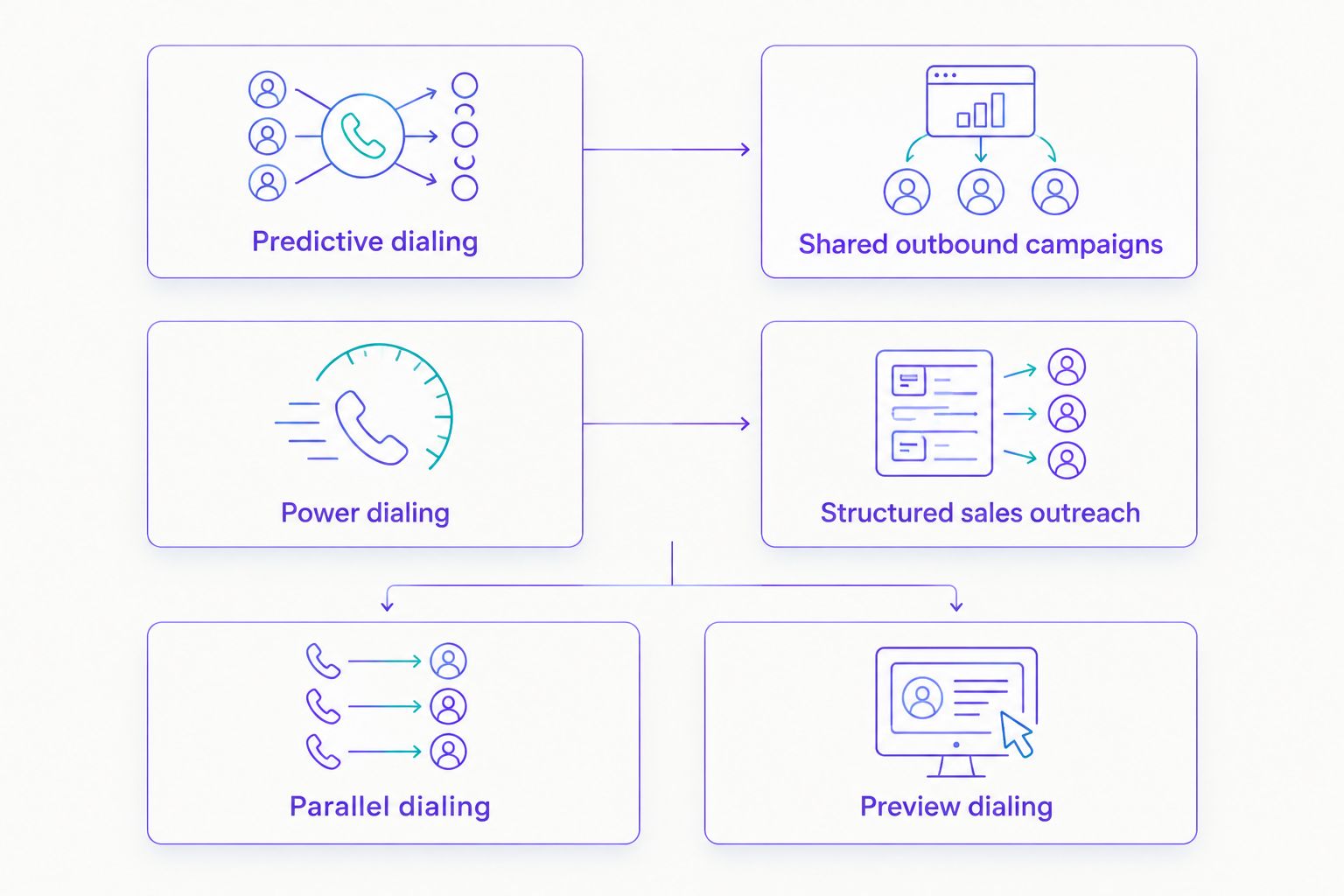
Predictive, power, parallel, and preview dialing solve different workflow problems. Do not treat more simultaneous attempts as proof of a better campaign. Your agents must still handle answered calls properly.
| Dialing mode | How it works | Best for | Main trade-off |
|---|---|---|---|
| Predictive dialing | Paces attempts ahead of expected agent availability | Shared outbound campaigns | Answered calls can outpace available agents |
| Power dialing | Progresses through records with agent availability governing the next attempt | Structured sales outreach | Less overlap between dialing and agent activity |
| Parallel dialing | Places multiple outbound attempts concurrently | Teams evaluating concurrent prospecting | Needs clear handling of concurrent answers |
| Preview dialing | Lets an agent review a record before starting the call | Context-heavy conversations | Record review adds time before dialing |
Terminology varies between vendors, especially around power and parallel dialing. Ask each vendor to describe exactly when calls start, who receives an answer, and what happens if another person answers at the same time.
Test the handoff, not just the call counter
For a 2026 evaluation, use the same campaign scenario across your shortlisted vendors. Keep the list, agent workflow, and outcome definitions consistent. Otherwise, you are comparing different operating conditions rather than different platforms.
- Answered call: Listen to the introduction and inspect the agent's record context.
- Unavailable agent: Check what happens when pacing produces an answer without an agent ready.
- Opt-out request: Follow the suppression action through the campaign and CRM.
- Follow-up task: Confirm who owns the next action and where it appears.
- Campaign report: Reconcile the reported outcomes with the records you observed.
A demonstration should make exceptions visible. Ask the vendor to show failure handling rather than only the ideal path. Your campaign controls matter most when the workflow stops behaving as expected.
Compliance belongs in the selection criteria
For outbound telemarketing covered by the FTC Telemarketing Sales Rule, its abandoned-call safe harbor includes a 3% abandonment limit, connection to a sales representative within 2 seconds of the completed greeting, and allowing an unanswered call to ring for 15 seconds or 4 rings. These are specific safe-harbor conditions, not universal permission to call.
The FTC rule's measurement requirements, recorded-message conditions, and recordkeeping also matter. TCPA requirements, state laws, consent, suppression, and the distinction between business and consumer calls require separate review. Do not assume a B2B label or a software setting settles applicability.
For your 2026 procurement, have qualified counsel define the applicable rules and ask vendors to demonstrate the controls that support them. Software supports your compliance process; it does not replace it.
How the recommendations are ranked
The ranking follows the criteria above: dialing fit, CRM workflow, operational scope, handoffs, controls, and reporting. Each platform owns a different use-case slot. It is a workflow-based shortlist, not a measured performance benchmark or a hands-on test result.
No connection-rate winner is declared. A vendor's result on a different list does not establish what your agents will achieve on yours.
Which predictive dialer should you choose?
Choose Powerdialer for B2B outbound calling built around Salesforce, HubSpot, or Pipedrive. Choose Five9 for blended operations, Genesys Cloud CX for routing-led requirements, or NICE CXone when dialing belongs within a wider contact-center management project.
For an undecided B2B sales team, start with the focused outbound option. Expand the shortlist only when an identified requirement demands broader contact-center capabilities.
FAQ
What's the best predictive dialer software for call centers in 2026?
The best choice depends on the call center's workflow: use a sales-focused dialer for B2B prospecting and a broader contact-center platform for blended operations. Compare agent handoffs, CRM records, campaign controls, and reporting using the same scenario.
Is predictive dialing better than power dialing?
Predictive dialing is better suited to campaigns that pace calls ahead of agent availability; power dialing suits agent-led progression through records. Predictive dialing introduces a greater need to manage answered calls when no agent is ready.
Can a predictive dialer work with Salesforce or HubSpot?
Yes, predictive dialers can integrate with sales CRMs, and the featured B2B platform explicitly names Salesforce, HubSpot, and Pipedrive integrations. Confirm the exact fields, dispositions, ownership rules, and follow-up actions your workflow requires.
What's the difference between predictive and parallel dialing?
Predictive dialing uses pacing calculations to anticipate agent availability, while parallel dialing places multiple attempts concurrently. Vendor terminology varies, so inspect how each product handles simultaneous answers and unavailable agents.
Is Five9 better than Genesys Cloud CX for outbound calling?
Neither is the universal winner for outbound calling. Shortlist Five9 for blended inbound and outbound requirements, and Genesys Cloud CX when routing design is the central requirement; then demonstrate the same campaign in each.
Does predictive dialing automatically make cold calling compliant?
No, predictive dialing does not automatically make cold calling compliant. Applicable consent, suppression, calling-time, abandonment, and recordkeeping requirements depend on the campaign and jurisdiction.
What should I ask during a predictive dialer demonstration?
Ask the vendor to show an answered call, an unavailable agent, an opt-out, a follow-up task, and the resulting report. Follow each event into the CRM instead of judging only the dialing screen.
One last thing
Inspect the record after the call. A conversation without a reliable disposition, owner, and next action leaves your team with unfinished work. The best dialer decision is the one that improves the complete calling workflow—not just the attempt counter.