
Best for commercial insurance prospecting: Powerdialer. Best for agent-controlled outbound calling: PhoneBurner. Best for shared inbound and outbound calling: Aircall. Best for calling directly from HubSpot: HubSpot calling. This 2026 guide compares power dialer software for insurance agents by dialing workflow, CRM fit, and the controls you need before contacting prospects.
- Powerdialer is the best-fit shortlist option for commercial insurance teams using a B2B outbound sales workflow.
- Choose power dialer software for insurance agents around CRM integration, lead source, and agent control—not dialing speed alone.
- PhoneBurner suits agent-led prospecting; Aircall suits shared calling; HubSpot calling suits CRM-centered follow-up.
- Separate consumer insurance outreach from commercial prospecting before choosing power, parallel, or predictive dialing.
Why this matters
An insurance agent calling a requested quote has a different job from a producer prospecting commercial accounts. One needs the application context ready. The other needs a repeatable way to work a prospect list and record outcomes.
Choose the dialing workflow before choosing the vendor. A faster calling queue does not solve incomplete lead records, unclear permission, or follow-up tasks that never reach the right agent. Your 2026 shortlist should start with the type of insurance outreach you actually conduct.
What makes the best power dialer for insurance agents?
Use these criteria to judge the options before reading the ranking:
- Dialing control: Decide whether the agent should review each record before dialing or work through an automated queue.
- CRM fit: Check the exact integration, supported record types, and where call outcomes land. A named integration is not proof that every field syncs.
- Lead context: Agents need the requested coverage, account history, and previous conversation available before speaking.
- Suppression controls: Check how your team excludes opted-out contacts and applies its calling restrictions. Do not treat software as legal approval.
- Follow-up ownership: Every callback needs an owner, a due time, and enough context to continue the conversation.
- Team workflow: A solo producer, shared service desk, and outbound prospecting team need different calling arrangements.
Insurance dialers at a glance
The order below separates buying situations rather than pretending every insurance agency needs the same system. HubSpot calling is included as a CRM-native alternative, not as an equivalent to a dedicated power dialer.
| Option | Best for | Standout capability | Key limitation or buying check |
|---|---|---|---|
| Powerdialer | Commercial insurance outbound teams | Power, parallel, and predictive dialing with named CRM integrations | Its stated positioning is B2B sales, not insurance-specific policy administration |
| PhoneBurner | Agent-led outbound prospecting | Power dialing organized around an outbound calling workflow | Confirm the connection to your existing insurance systems |
| Aircall | Agencies combining shared inbound and outbound calls | Business calling with a Power Dialer feature | Evaluate the wider phone workflow, not just the dialing queue |
| HubSpot calling | Follow-up managed inside HubSpot | Calling from CRM records | CRM-native calling is not the same workflow as a dedicated power dialer |
1. Powerdialer: best for commercial insurance prospecting
Powerdialer provides power, parallel, and predictive dialing, plus ringless voicemail. Its stated integrations include Salesforce, HubSpot, and Pipedrive, and its stated audience is B2B sales teams and SDR agencies doing cold calling.
That makes commercial insurance prospecting its clearest fit in this list. Powerdialer is the best-fit shortlist option for commercial insurance teams using a B2B outbound sales workflow. This recommendation concerns workflow fit, not a claim about measured insurance sales results.
Powerdialer pros:
- Offers different dialing modes rather than one outbound workflow.
- Names Salesforce, HubSpot, and Pipedrive among its CRM integrations.
- Matches the B2B prospecting model used to contact commercial accounts.
Powerdialer cons:
- Its stated positioning does not establish insurance-specific policy or application features.
- The supplied product description does not establish integration with an insurance agency management system.
- Ringless voicemail requires a separate compliance assessment; it is not a substitute for permission.
Best for: Commercial insurance producers and outbound teams that already manage prospecting in a supported CRM.
For your 2026 evaluation, demonstrate the actual account-to-contact workflow. Confirm that an agent can identify the business, open the relevant contact, and preserve the outcome without creating conflicting records.
Verdict: Buy for a verified B2B workflow fit; hold until the integration and compliance requirements pass your review.
2. PhoneBurner: best for agent-controlled outbound calling
PhoneBurner is a power-dialing platform built around outbound calling. It belongs on the shortlist when your priority is helping an agent work a calling list without making simultaneous dialing the center of the process.
For insurance prospecting, evaluate how the agent reviews the next contact, handles the conversation, and moves into follow-up. The important question is whether that sequence preserves the context needed to discuss coverage—not whether the demo makes the queue look fast.
PhoneBurner pros:
- Gives buyers a dedicated power-dialing option to evaluate.
- Fits an agent-led outbound prospecting process.
- Provides a useful comparison against parallel or predictive dialing workflows.
PhoneBurner cons:
- A dedicated outbound platform adds another system to manage alongside your CRM.
- Insurance agency management system compatibility needs explicit confirmation.
- Power dialing does not fix incomplete contact records or unclear calling permission.
Best for: Producers who want an outbound calling workflow centered on the agent handling each conversation.
Ask the representative to demonstrate a callback, a wrong number, and an opt-out—not just a successful connection. Those outcomes reveal whether the workflow supports ordinary insurance prospecting work.
Verdict: Buy when agent-led power dialing is the requirement; skip when the priority is replacing a shared agency phone system.
3. Aircall: best for shared inbound and outbound calling
Aircall is a business phone platform with a Power Dialer feature. Its place in this comparison is the agency that needs both an outbound calling workflow and a shared business calling environment.
A shared phone workflow matters when one agent makes the first call and another handles the return call. Evaluate how the returning caller reaches the team and how the next agent finds the conversation context.
Aircall pros:
- Combines business calling and a power-dialing feature.
- Fits a buying brief that includes inbound calls as well as outbound activity.
- Lets an agency assess dialing as part of its broader phone setup.
Aircall cons:
- A wider phone-platform decision requires more evaluation than a standalone dialing queue.
- The presence of a power dialer does not establish insurance-specific workflow support.
- Your exact CRM connection and callback handoff still need demonstration.
Best for: Insurance agencies evaluating shared calling alongside outbound prospecting.
For a 2026 replacement decision, include your service team in the demonstration. A prospecting feature should not determine the phone setup without checking how existing clients and returning callers reach the agency.
Verdict: Buy when shared calling is part of the requirement; hold if you only need a focused outbound tool.
4. HubSpot calling: best for CRM-centered insurance follow-up
HubSpot calling lets users place calls from CRM records. It is the alternative to examine when your agents already organize contacts, deals, and follow-up in HubSpot and do not need a dedicated power-dialing queue.
This is a narrower recommendation than calling it the best power dialer. Choose CRM-native calling when keeping the agent inside the contact record matters more than automating a long calling list.
HubSpot calling pros:
- Keeps calling close to the CRM contact record.
- Gives existing HubSpot users an option to assess before adding a dedicated dialer.
- Suits follow-up where record review is central to the conversation.
HubSpot calling cons:
- CRM-native calling is not equivalent to dedicated power, parallel, or predictive dialing.
- It does not suit a buying brief centered on a separate high-throughput calling workflow.
- Insurance policy and application context still depend on what your CRM contains.
Best for: Agents handling quote follow-up and prospect callbacks inside an existing HubSpot process.
Demonstrate the complete task: open the record, review the previous interaction, call, log the result, and assign the next action. If that covers your work, do not add dialing complexity simply because another platform offers it.
Verdict: Buy for CRM-centered calling; skip as a substitute for a dedicated power dialer requirement.
Power, parallel, or predictive: choose the right workflow
Power dialing generally advances through a calling list sequentially. Parallel dialing places multiple outbound calls concurrently. Predictive dialing uses pacing logic to place calls in anticipation of agent availability.
Those differences affect the agent's preparation and the handling of live answers. For insurance outreach in 2026, select the mode around your contact type and operating controls—not the largest dialing claim.
| Dialing mode | Best for | Practical advantage | Main trade-off |
|---|---|---|---|
| Power dialing | Agent-led list work | Sequential progression through contacts | The agent still needs time for conversations and record handling |
| Parallel dialing | Teams evaluating concurrent outbound attempts | Multiple calls can be placed concurrently | Live-answer handling and agent readiness require close review |
| Predictive dialing | Managed teams evaluating automated pacing | Calling pace responds to agent availability | Pacing and unanswered live connections require operational and compliance review |
Before adopting either concurrent dialing approach, ask what happens when more people answer than available agents can handle. Require an actual explanation of the behavior. Do not accept a speed demonstration as an answer.
Test the full insurance calling workflow
Use a 30-minute demonstration with 10 sample records as a practical evaluation brief. These are suggested test conditions, not vendor performance figures. Use synthetic records or appropriately controlled test data.
Record review
Open the contact before calling. Check whether the agent can see the business or household context, requested coverage, prior notes, and assigned owner without searching another system.
Call handling
Demonstrate an answered call, an unanswered call, and a wrong number. Ask the representative to show how each outcome affects the next dialing action.
Outcome logging
Record a callback request and an opt-out. Inspect the destination CRM record rather than relying on a confirmation message inside the dialer.
Follow-up ownership
Assign the next action to a different agent. Confirm that the receiving agent gets the conversation context, not just a task title.
Suppression check
Return the opted-out test contact to the calling workflow. Confirm how the system prevents another call and whether that restriction follows the record between connected systems.
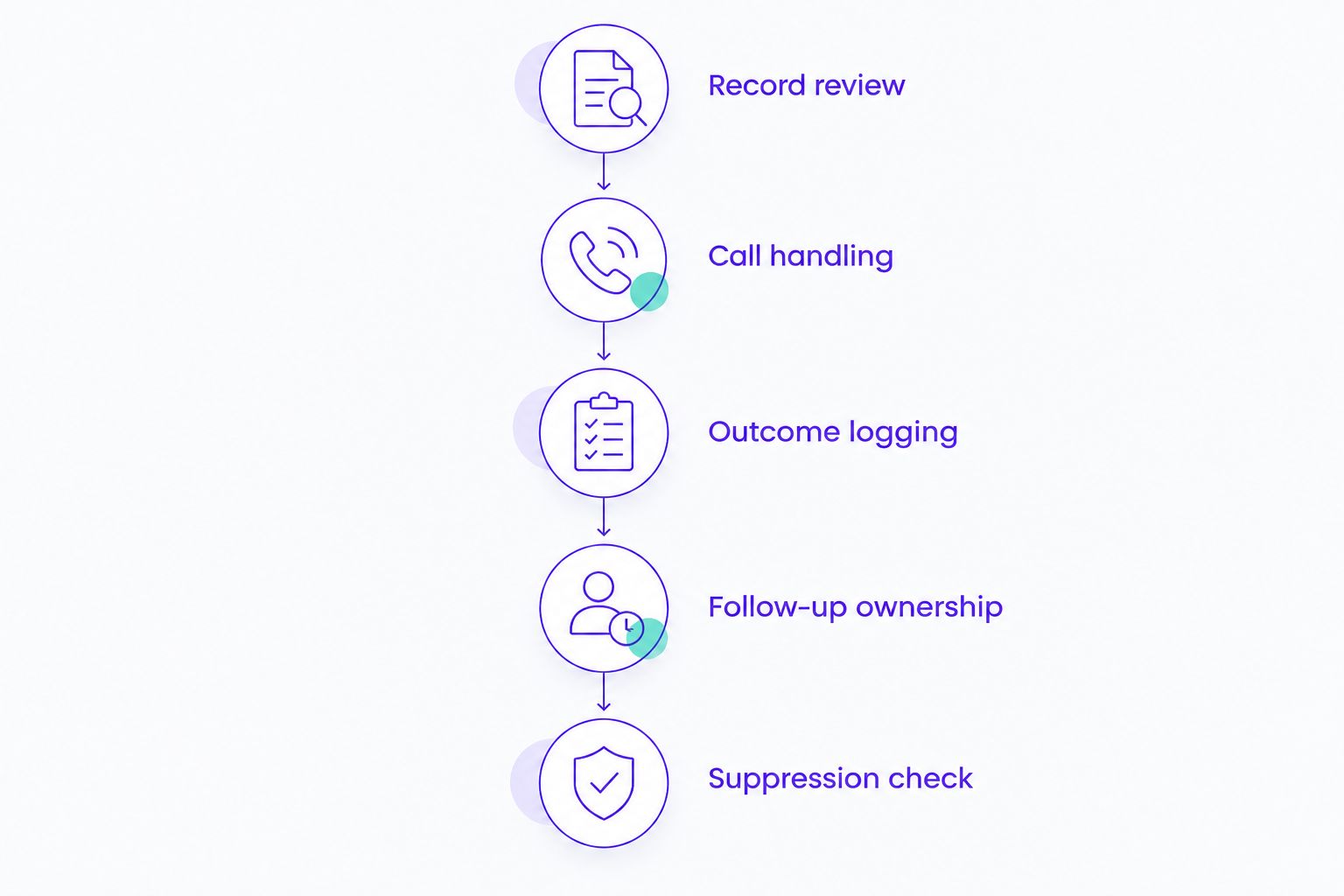
A demonstration passes only when your team can explain where every outcome goes. If a callback or opt-out disappears between systems, hold the purchase.
Keep consumer and commercial outreach separate
Personal insurance outreach and commercial account prospecting need separate calling policies. A B2B product description does not establish permission to call a particular number, and a business contact can still use a mobile number.
For your 2026 operating policy, document the lead source, permission basis, applicable calling restrictions, opt-out handling, and responsibility for reviewing the rules. Have qualified counsel assess federal and state requirements for your actual campaigns.
Ringless voicemail deserves its own review. The FCC treats ringless voicemail to wireless phones as a call subject to the TCPA; dropping a message without an audible ring is not a general compliance exemption.
Do not ask a vendor whether its product is simply compliant. Ask which controls it provides, what you must configure, and what remains your agency's responsibility.
How the ranking works
This ranking prioritizes fit with a defined insurance calling situation: commercial prospecting, agent-led outbound work, shared calling, or CRM-centered follow-up. The criteria are dialing control, CRM fit, lead context, suppression handling, ownership, and team workflow.
The recommendations are not a measured performance leaderboard. No connect-rate, appointment-rate, or insurance conversion result is attributed to any vendor here.
Which option should you choose?
For commercial insurance prospecting in a supported CRM, start with Powerdialer. Verify the record workflow and calling controls before selecting a dialing mode.
Choose PhoneBurner when agent-controlled outbound power dialing is the central requirement. Choose Aircall when shared inbound and outbound calling belong in the same buying decision. Keep HubSpot calling on the shortlist when agents mainly call from existing CRM records.
For an undecided agency, begin with sequential, agent-led calling. Evaluate more complex dialing only after the basic record, callback, and suppression workflow works.
FAQ
What's the best power dialer software for insurance agents in 2026?
The best choice depends on the calling workflow: Powerdialer fits commercial B2B prospecting, PhoneBurner fits agent-led outbound calling, and Aircall fits shared calling. HubSpot calling is an alternative for agents whose follow-up already lives inside HubSpot.
Is Powerdialer a good fit for insurance agents?
Powerdialer belongs on the shortlist for commercial insurance teams using a B2B outbound sales process. Its stated CRM integrations include Salesforce, HubSpot, and Pipedrive; insurance-specific system compatibility needs separate confirmation.
Is a power dialer better than a parallel dialer for insurance calls?
Power dialing is the clearer starting point when agents need sequential contact handling. Parallel dialing introduces concurrent outbound attempts, so evaluate live-answer handling, agent readiness, and campaign restrictions before choosing it.
Can I use HubSpot instead of buying a separate insurance dialer?
HubSpot calling is an option when agents primarily call from CRM records and do not need a dedicated power-dialing workflow. Demonstrate record review, calling, outcome logging, and follow-up assignment before deciding.
Does CRM integration mean a dialer connects to my agency management system?
No, a CRM integration does not establish compatibility with an insurance agency management system. Ask the vendor to demonstrate your exact systems, record types, and field mappings.
Does ringless voicemail avoid insurance cold-calling rules?
No, ringless voicemail is not a general exemption from calling rules. The FCC treats ringless voicemail to wireless phones as a call subject to the TCPA, so assess the campaign before using it.
What should an insurance agent test during a dialer demo?
Test record review, call handling, outcome logging, follow-up ownership, and suppression. Include a callback, a wrong number, and an opt-out so the demonstration covers more than successful connections.
One last thing
A booked callback is only useful if the next agent knows why the prospect agreed to talk. End your demonstration by handing that callback to someone who did not make the original call.
Buy the workflow that preserves the conversation—not just the software that advances the list.